Governing Microsoft Foundry: four ways to call it, and only three can be governed
On Foundry, how much governance you get is decided by one thing — who holds the model client. The Foundry SDK hands you a plain OpenAI client, so all seven Cendor libraries work with no Foundry-specific code. The Azure AI Inference SDK hands you a different shape, and instrument() returns it untouched: zero events, budgets that never bind, an empty audit chain, and an app that looks fine. Plus the deployment name that makes a USD cap silently do nothing. Python and TypeScript, runs offline with no Azure account.
There are four ways to call a model on Microsoft Foundry. They look interchangeable in the portal. They are not interchangeable at all, and the difference is not about features — it is about who holds the model client.
Hold it yourself and every governance control you can name works, because they all attach at that one
seam. Hand it to a managed runtime and you can account for calls but never refuse one. And there is a
fourth option, still in plenty of production code today, where the client is a different shape — so
instrument() politely hands it back untouched, no events are emitted, your budgets never bind, your
gates never fire, your audit chain stays empty, and nothing anywhere says a word. The app works.
That is the problem.
Microsoft retires that one on 26 August 2026.
What you’ll build
A Foundry call that is budgeted, gated, context-managed, compressed, replayable and audited — and, more usefully, a way to tell at a glance which of those you actually have.
flowchart TB
  Q{"who holds the<br/>model client?"}
  Q -->|"you — openai SDK<br/>at /openai/v1/"| A["full governance"]
  Q -->|"you — Foundry SDK<br/>get_openai_client()"| B["full governance<br/>zero Foundry-specific code"]
  Q -->|"you — azure-ai-inference"| C["NOTHING captured<br/>retired 2026-08-26"]
  Q -->|"Foundry Agent Service<br/>server-side loop"| D["otel.ingest()<br/>accounting + evidence,<br/>no pre-flight refusal"]
Everything below runs offline against a fake client with the Foundry response shape — no Azure
account, no key — because instrument() identifies a client by its structure, not its class name.
Step 0 — where to start
git clone https://github.com/cendorhq/cendor-cookbook && cd cendor-cookbook && uv sync
uv run python recipes/providers/azure-foundry/main.py
git clone https://github.com/cendorhq/cendor-cookbook-js && cd cendor-cookbook-js
cd recipes/providers/azure-foundry && npm install && node index.mjsTwo placeholders appear below and the difference matters.
my-chat-deploymentis the recipe’s own default — what the offline sample literally prints, reproducible right now.<your-deployment>marks where a real deployment name was scrubbed from a live transcript. The model behind that real one was agpt-5-mini, which is the fact that matters; the name itself is arbitrary, which is rather the point.
Step 1 — connect, and know which of the four you are in
The one Microsoft documents for new code
The plain openai client against the v1 GA route. No AzureOpenAI, no api-version:
from cendor.core import instrument
from openai import OpenAI

client = instrument(OpenAI(
    base_url=f"{AZURE_OPENAI_ENDPOINT}/openai/v1/",
    api_key=AZURE_OPENAI_API_KEY,
))
import { instrument } from '@cendor/core';
import OpenAI from 'openai';
const client = instrument(new OpenAI({
baseURL: `${AZURE_OPENAI_ENDPOINT}/openai/v1/`,
apiKey: AZURE_OPENAI_API_KEY,
}));Three endpoint forms all work: <res>.openai.azure.com, <res>.services.ai.azure.com, and the
project endpoint <res>.services.ai.azure.com/api/projects/<name>. ⚠️ A bare project endpoint with
no /openai/v1/ answers 400 Missing required query parameter: api-version, which reads like “go
back to the legacy client” and is not. Append the path.
And to be clear, since removing it from the docs made people ask: AzureOpenAI still works.
Detection is structural and there is a regression test pinning it. It is gone from what we teach,
not from what we capture.
The Foundry SDK, which is the interesting one
If your app already builds an AIProjectClient, you do not need a second client and you do not need
anything Foundry-specific from Cendor:
from azure.ai.projects import AIProjectClient
from azure.identity import DefaultAzureCredential
from cendor.core import instrument

project = AIProjectClient(
    endpoint=AZURE_PROJECT_ENDPOINT,          # …/api/projects/<your-project>
    credential=DefaultAzureCredential(),      # Microsoft Entra ID, keyless
)
client = instrument(project.get_openai_client())
import { AIProjectClient } from '@azure/ai-projects';
import { DefaultAzureCredential } from '@azure/identity';
import { instrument } from '@cendor/core';
const project = new AIProjectClient(AZURE_PROJECT_ENDPOINT, new DefaultAzureCredential());
const client = instrument(project.getOpenAIClient());get_openai_client() returns a plain OpenAI client pointed at <endpoint>/openai/v1. That is
the whole trick: there is nothing for Cendor to learn, because by the time you have a client it is
already a shape instrument() knows. Captured as provider="openai", with usage and cost, verified
live in both languages.
Two things worth knowing here, because both get guessed wrong:
- It covers every model in the project, not just the OpenAI ones. DeepSeek, Grok, Llama, Mistral — the model’s maker never changes the client’s shape. (Pricing is a separate matter; see Step 3.)
- Do not go looking for a
FoundryProvideror a[foundry]extra for this. There isn’t one, and the[foundry]extra that does exist is a different integration — the attribution adapter for the Agent Service, which is Step 5.azure-ai-projectsis your dependency; Cendor never pulls it.
The one that captures nothing
# ⚠️ NOT a detection target. instrument() returns this untouched.
from azure.ai.inference import ChatCompletionsClient
client = instrument(ChatCompletionsClient(endpoint=…, credential=…))   # zero LLMCalls, ever
The same is true of the TypeScript Azure AI Inference client — it is the shape that is
unrecognised, not the language — and the fix is identical in both: build the plain openai client
against /openai/v1/ as at the top of this step.
The Azure AI Inference beta SDK — ChatCompletionsClient, the /models route — is a genuinely
different client shape. instrument() does not recognise it, so it returns it unchanged and emits
nothing. Every downstream control is therefore a no-op: no tokens counted, no cost, no budget that can
bind, no gate that can fire, an audit chain with nothing in it. And the application behaves
perfectly, which is what makes this worse than a crash.
There is no Cendor-side fix and none is planned. Microsoft deprecated this SDK and retires it on
26 August 2026; the GA /openai/v1 API is the replacement. Migrating the client is the fix, and
it is the two-line change at the top of this step.
Step 2 — the seven libraries, on a Foundry client
This is the part that surprises people who expect an Azure integration to be a special case. Once
instrument() has the client, nothing downstream knows or cares that this is Foundry. The
deployment name flows through as the model id and every library behaves exactly as it does on OpenAI.
Five of the seven are in the providers/azure-foundry recipe:
from cendor.core import instrument, prices          # 1 the seam + the price table
from cendor.tokenguard import budget, BudgetExceeded # 2 pre-flight USD/token caps
from cendor.guardrails import install, rules         # 3 gate before the request leaves
from cendor import cassette                          # 4 record once, replay for $0
from cendor.acttrace import AuditLog, verify         # 5 a hash-chained evidence file

install([rules.keyword_deny(["ignore previous instructions"], action="block")])

with AuditLog(system="foundry-agent", risk_tier="limited", path=chain) as audit:
    with audit.decision(input="policy question", actor="agent") as dec:
        with budget(usd=1.00, on_exceed="block"):
            client.chat.completions.create(
                model=DEPLOYMENT,                    # your deployment name, not a model id
                messages=[{"role": "user", "content": "Is this request within policy?"}],
                max_tokens=64,
            )
        dec.record(model=DEPLOYMENT)
import { instrument, prices } from '@cendor/core'; // 1
import { withBudget, BudgetExceeded } from '@cendor/tokenguard'; // 2
import { install, rules } from '@cendor/guardrails'; // 3
import * as cassette from '@cendor/cassette'; // 4
import { AuditLog, verify } from '@cendor/acttrace'; // 5
install([rules.keywordDeny(['ignore previous instructions'], { action: 'block' })]);
const audit = new AuditLog('foundry-agent', { riskTier: 'limited', path: chain });
await audit.decision(async (dec) => {
await withBudget({ usd: 1.0, onExceed: 'block' }, async () => {
await client.chat.completions.create({
model: DEPLOYMENT, // your deployment name
messages: [{ role: 'user', content: 'Is this request within policy?' }],
max_tokens: 64,
});
});
dec.record({ model: DEPLOYMENT });
}, { input: 'policy question', actor: 'agent' });Run it and each one reports for itself:
gate                  BLOCKED by keyword_deny - provider saw 0 call(s), $0
priced (registered)   BudgetExceeded: pre-flight block: projected $0.000672500 would exceed cap $0.00001 (model=my-chat-deployment)
priced, cap raised    provider=openai model=my-chat-deployment 1200 in / 400 out -> $0.007000000 (estimated)
cassette              replayed 1 call, 0 provider call(s), $0
verify()              True - ok: 5 entries, head 389a83f0dcff…
The injection never reached the deployment. The cap refused a call before it was sent. The same
exchange replayed from a tape with zero provider calls. And the whole thing is on a hash-chained file
that verify() re-walks offline — change one byte and it fails at that exact entry. (Entry count and
verify() reproduce on your machine; the head hash will not, because entries carry timestamps.)
The other two — contextkit and squeeze — sit above the client, so they are provider-agnostic
by construction. They are not in the provider recipe because it is a single-call sample, but the M365
agent recipe runs all seven against a client whose documented swap is exactly the Foundry one above:
from cendor.contextkit import Block, Context as CkContext   # 6 pack history into a token budget
from cendor.squeeze import compress                          # 7 shrink a block, reversibly

ctx = CkContext(budget_tokens=1200, model=DEPLOYMENT, reserve_output=256)
text, _handle = compress(blob, kind="prose", target_tokens=256, model=DEPLOYMENT)
messages = ctx.assemble()          # what fits, with a receipt of what was dropped
import { Block, Context as CkContext } from '@cendor/contextkit'; // 6
import { compress } from '@cendor/squeeze'; // 7
const ctx = new CkContext({ budgetTokens: 1200, model: DEPLOYMENT, reserveOutput: 256 });
const [text] = compress(blob, { kind: 'prose', targetTokens: 256, model: DEPLOYMENT });
const messages = await ctx.assemble(); // note: assemble() is async in TypeScriptBoth take model=DEPLOYMENT for token counting, which is the one place the deployment name matters to
them — and the one place it can bite, since an unpriced id still counts tokens perfectly well.
Step 3 — the money, which is the one thing Foundry genuinely breaks
Everything above works on a deployment name. Cost does not, and it fails silently.
You do not call a model, you call a deployment. Your deployment is named prod-chat, or whatever
your platform team picked, and that string is in no price table on earth. So:
unpriced (as shipped)  provider=openai model=my-chat-deployment 1200 in / 400 out -> None (estimated)
  warning: UnpricedModelWarning: tokenguard: no price for model 'my-chat-deployment', so the active
           USD budget (on_exceed='block') counts its calls as $0 and cannot enforce a USD cap on it.
  -> the $0.00001 USD cap did NOT bind: an unpriced call projects $0.
Read that first line carefully, because three of its four fields are right. provider=openai —
detection worked. Exact token counts — capture worked. Then cost -> None.
None, not $0.00. Cendor does not know what your deployment costs, so it says so rather than
inventing a zero that would look like a number and read like a fact. An unknown cost projects as $0,
and $0 never exceeds a cap.
The fix is one line, and it is not a rate card. You know the thing the price table cannot: which model your deployment serves.
from cendor.core import prices

prices.register_deployment(DEPLOYMENT, like="gpt-4o")
import { prices } from '@cendor/core';
prices.registerDeployment(DEPLOYMENT, { like: 'gpt-4o' });Four decisions in that line, each of which could have gone the lazy way:
- Nothing is inferred from the name. Guessing that
prod-gpt4o-eastusmeansgpt-4o, resolving-preview/-latestaliases, was considered and rejected: a confidently wrong price is worse than an honestNone. - An unknown base raises.
like="gpt-4p"is anUnknownModelError, not a shrug — otherwise the call to fix the silence would reproduce it. - Every rate key is copied, not the two you would have typed. The recipe prints
cached, input, output: cache reads bill at a discount on Azure and a hand-typedinput=…, output=…silently drops that rate. - Copy-at-registration, not a live alias. A later
prices.refresh()that repricesgpt-4odoes not reprice your deployment; call it again.
Hold the exact numbers instead — a fine-tune, a negotiated rate —
prices.register_model_price(id, input=2.50, output=10.00) takes USD per 1M tokens. Prefer to fail
closed? tokenguard.configure(on_unpriced="raise") refuses an unpriced call outright, and a token
budget binds with no rate at all, because it counts tokens the provider does report.
⚠️ Two cases where like= will not save you. Most non-OpenAI Foundry models have no base to copy
— the bundled snapshot carries no DeepSeek, Mistral or Phi rows, so like= raises and you want
register_model_price with the rate card. And a model-router deployment cannot be priced by this
method at all: the router picks a different model per request and bills at that model’s rates while
reporting its own id, so no single registration is right for every call. Register the priciest member
of the pool if a cap must bind — over-estimating is the safe direction — and never the cheapest.
The other half: azure now maps 104 models, not 23
register_deployment(dep, like=…) needs the base model to be in the table. Until recently, on
Azure, that was a much shorter list than it looked.
The azure refresh source reads Microsoft’s own Retail Prices catalog. Its filter was
productName eq 'Azure OpenAI' — and Microsoft moved the taxonomy: the meters now live under
serviceName eq 'Foundry Models'. Measured on 2026-08-01, the old filter saw 462 of 1,526
eastus2 meters and mapped 23 models, missing GPT-5 entirely (353 meters) along with every Foundry
family — DeepSeek, Grok, Mistral, Llama, Phi, Kimi, Qwen. That is exactly why gpt-5-mini came back
unpriced in the 2026-07-31 audit.
Rewritten and re-measured in both languages, identically: 104 models, from 2026-07-01.
prices.refresh(source="azure", region="eastus2")   # Microsoft's own catalog, keyless
prices.register_deployment(DEPLOYMENT, like="gpt-5-mini")   # now resolves
Two things that fell out of doing it, both of which had been silently wrong:
- ⚠️
optmeans OUTPUT in an Azure meter name — 141 rows use it. The parser looked only foroutp/output, so every GPT-5.x family would have had an input rate and no output rate. It was proven by price, not by reading:GPT 5.1 inp Glat 1.25/1M againstGPT 5.1 opt Glat 10.0/1M is GPT-5.1’s published $1.25/$10. - ⚠️ A region is mandatory, not an optimisation. Unregioned, that query is ≥25,000 rows and
still paging after 28.5 seconds — not something a library may do inside one
refresh(). Henceregion=, defaulting toeastus2.
⚠️ And the trade to know before you reach for it: refresh(source=…) REPLACES the table rather than
merging into it. A first-party catalog is authoritative and narrow — refreshing onto azure gives
you Microsoft’s meters and drops everything else. A bare prices.refresh() is the one that
reconciles the cloud catalogs with the MIT aggregators into a single dated, per-row-provenanced table,
and it is the default.
And now the deployment can say where its rate came from
The like= line above is an assertion — this deployment serves that model — so the useful question
afterwards is whether it is still in effect. prices.explain(id) answers it without reading any
source:
e = prices.explain(DEPLOYMENT)
print(e.summary())
# prod-gpt4o-eastus: cached=0.00000125 input=0.0000025 output=0.00001
#   — registered, from bundled as of 2026-08-02
e.registered    # True — one of MY registrations is in effect
e.row_source    # which source that specific rate came from
e.row_asof      # that source's own as-of date, not the day it was fetched
const e = prices.explain(DEPLOYMENT);
console.log(e.summary());
e.registered; // true — one of MY registrations is in effect
e.rowSource; // which source that specific rate came from
e.rowAsof; // that source's own as-of date, not the day it was fetchedhow is the field to read: registered (your line), exact (the id is a table key), normalized (a
wire-level id reduced to its base), or unpriced — and unpriced is an answer, not an exception.
On a deployment that is the difference between a cap you can defend in a review and a number nobody
can source.
The bundled snapshot carries that provenance because it is generated from the cendor-prices feed (opens in a new tab) rather than typed by hand — 849 rows, each with the source and date it came from, on a static file with no account and no server behind it. Hand-typing was not merely tedious: the previous 44 hand-fed rows had drifted, one of them 5× off every other source.
Step 4 — watch the difference
Cendor emits standard OpenTelemetry, so any OTLP backend shows this. The quickest is the self-hosted Cendor Monitor container:
docker run --rm -p 3000:3000 -p 4318:4318 -v cendor-monitor-data:/data \
  ghcr.io/cendorhq/cendor-monitor:0.15.0
export OTEL_EXPORTER_OTLP_ENDPOINT=http://localhost:4318
⚠️ The environment variable on its own is not enough, and — fittingly for this post — the failure is silent. Cendor’s telemetry is
mode=auto: it attaches once your app configures a global OpenTelemetry provider and emits nothing before that. Measured: with only the variable set, the recipe runs green and the console stays at 0 runs.CENDOR_DEBUG_TELEMETRY=1prints which state you are in —armed (mode=auto); waiting for a providerversusprovider=detected, emitter=attached. The bootstrap is the standard OTel one, with no Cendor-specific code in it:
from opentelemetry import trace
from opentelemetry.sdk.trace import TracerProvider
from opentelemetry.sdk.trace.export import BatchSpanProcessor
from opentelemetry.exporter.otlp.proto.http.trace_exporter import OTLPSpanExporter

provider = TracerProvider()
provider.add_span_processor(BatchSpanProcessor(OTLPSpanExporter()))
trace.set_tracer_provider(provider)      # the ONE global setup — your app owns it
import { NodeSDK } from '@opentelemetry/sdk-node';
import { OTLPTraceExporter } from '@opentelemetry/exporter-trace-otlp-http';
new NodeSDK({ traceExporter: new OTLPTraceExporter() }).start(); // the ONE global setupThe Calls list then shows Step 3’s whole argument in one table — the same deployment, the same 1,600 tokens, five times:
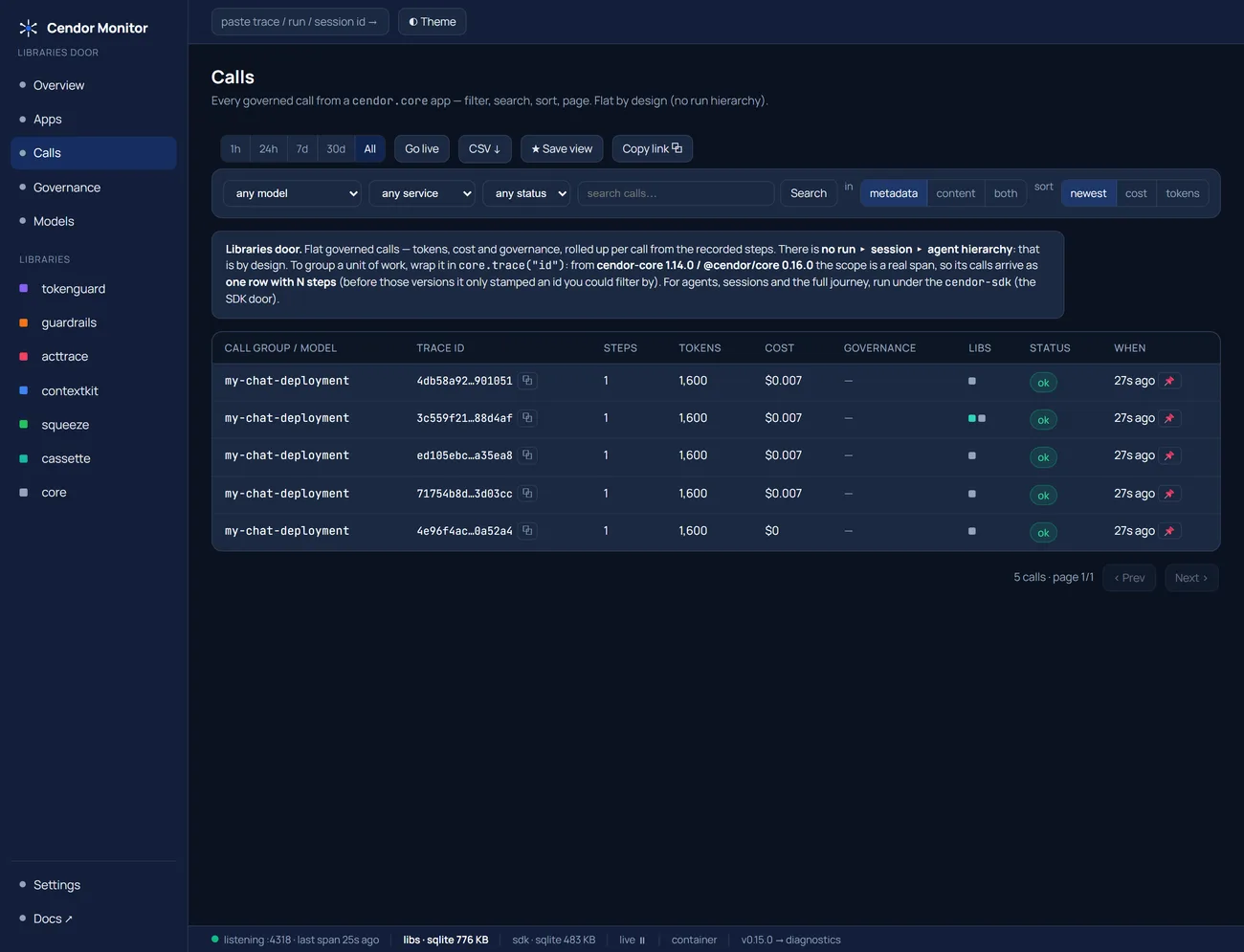
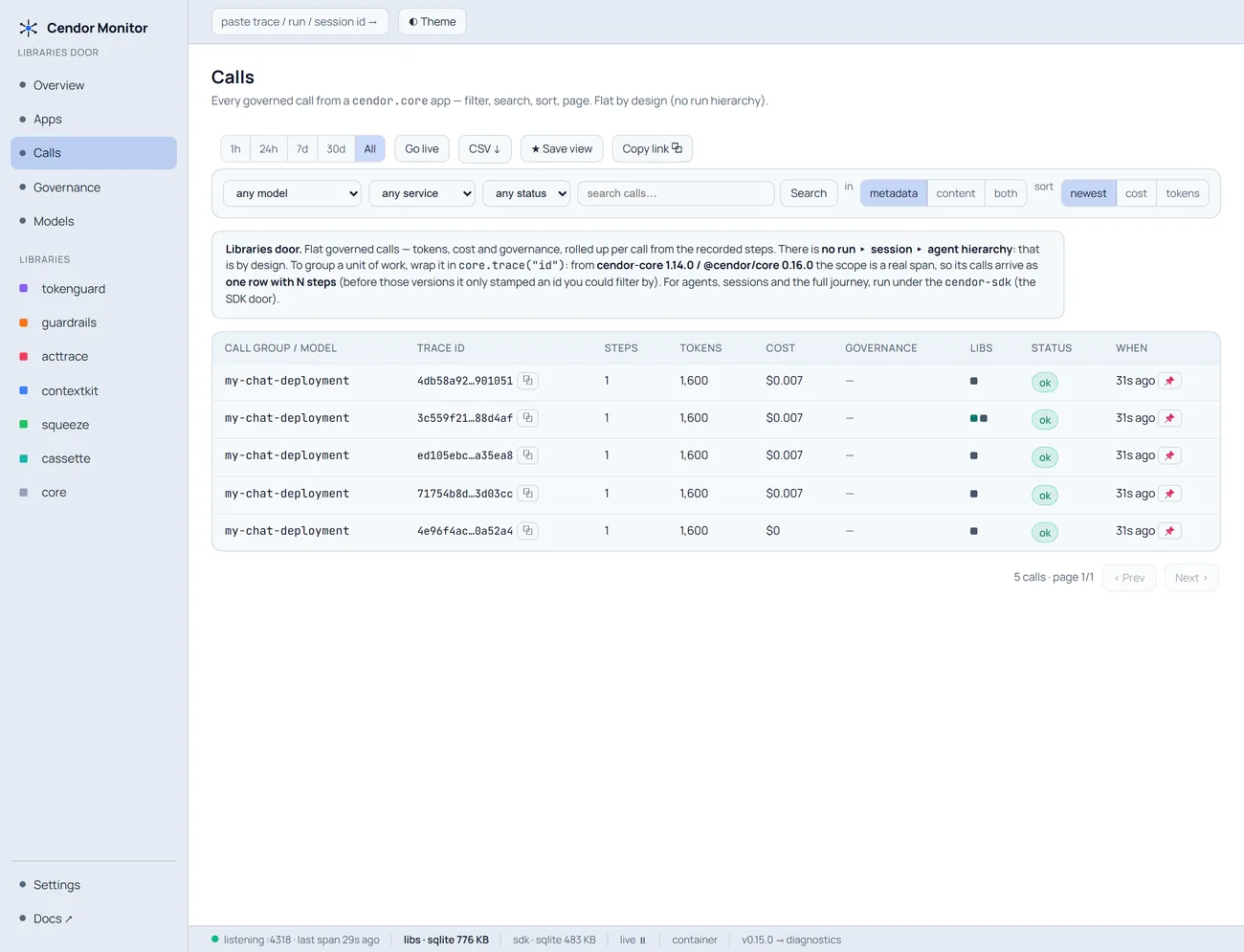
Four rows at $0.007. One at $0 — the call made before registration. Nothing errored, nothing
was flagged, and that row looks exactly as legitimate as the others. That is what an unenforced cap
looks like from the outside: not a failure, just a smaller number.
The governance stream shows the other half — the budget block that only exists once the deployment is priced:
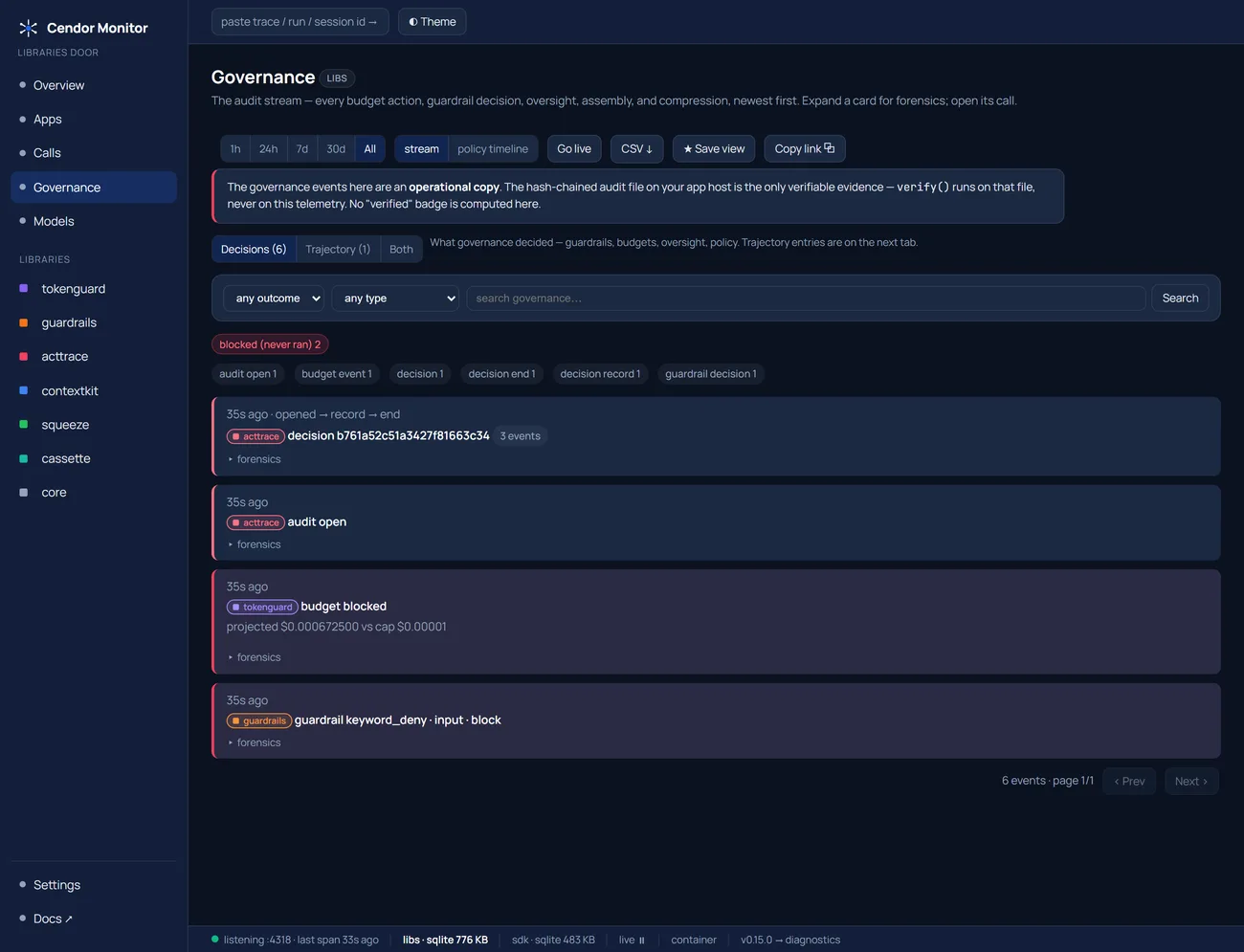
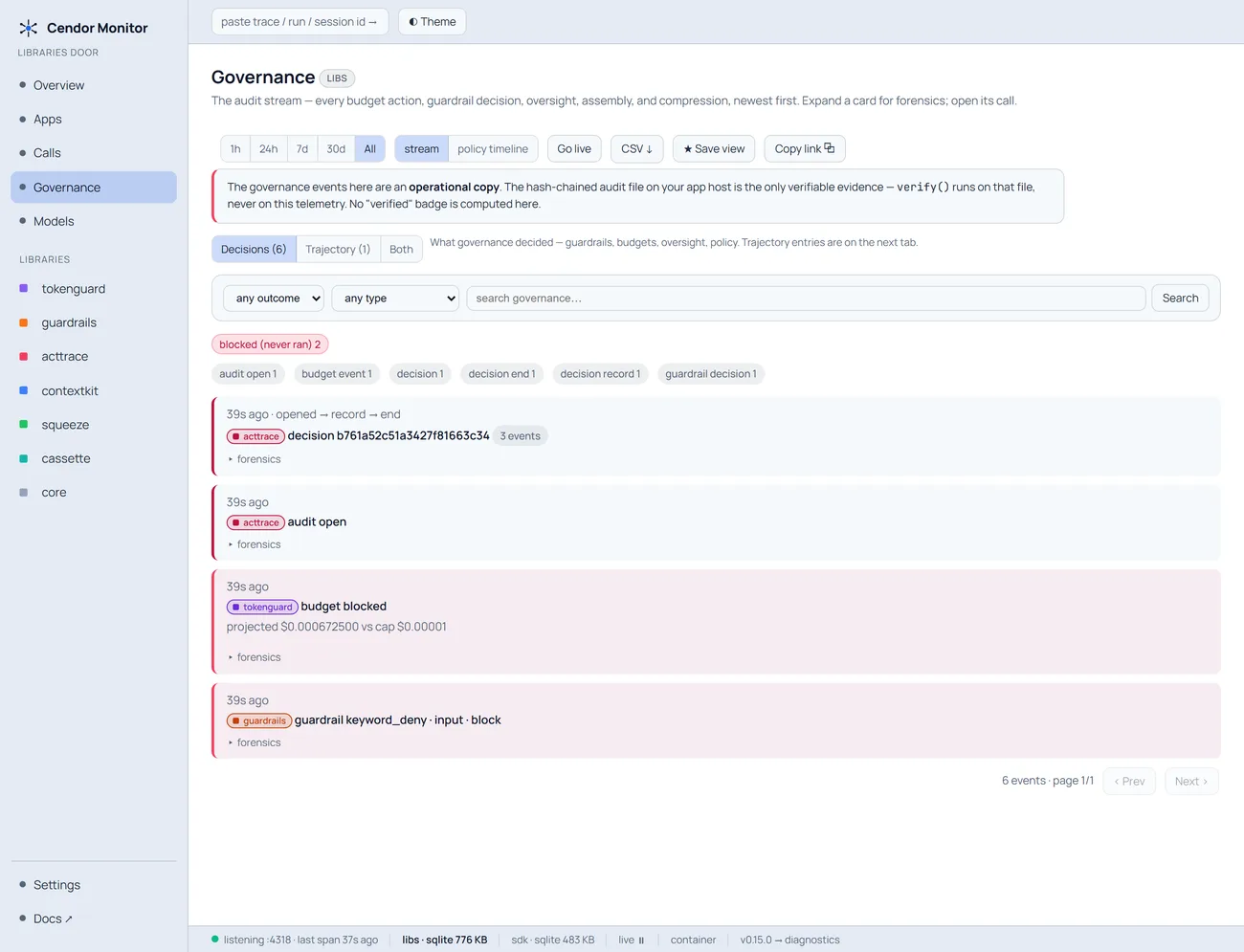
budget blocked — projected $0.000672500 vs cap $0.00001. Before the registration that event was not
merely missing from the screen; it never happened.
Note the banner at the top of that page. These events are an operational copy: the hash-chained
audit file on your own host is the only verifiable evidence, and verify() runs on that file, never on
this telemetry. The container is optional dev tooling — no library depends on it, and Cendor never
operates a telemetry endpoint.
Step 5 — when you do not hold the client at all
Everything so far assumes the model call happens in your process. With Foundry’s Agent Service it
does not: the loop runs server-side, so there is nothing to instrument(). Pretending otherwise would
be the dishonest version of this post.
What you can do is ingest its telemetry. Foundry emits OpenTelemetry gen_ai.* spans, and
otel.ingest() turns those attributes into the same normalized events, so budgets, spend attribution
and the audit chain populate from calls your process never made:
from cendor.core import otel
from cendor.tokenguard import report, track

with track(feature="foundry_agent"):
    for span in spans:                      # your exporter's finished gen_ai.* spans
        otel.ingest(dict(span.attributes))
import { otel } from '@cendor/core';
import { track } from '@cendor/tokenguard';
await track({ feature: 'foundry_agent' }, async () => {
for (const span of spans) otel.ingest({ ...span.attributes });
});ingested 3 Foundry gen_ai.* spans (calls this process never made)
tokenguard: $0.018325000 across 3 calls
acttrace : 3 llm_call entries, verify: TrueA note on the recipes, so you are not surprised by what you click.
otel.ingest()is exported in both languages, and the TypeScript snippet above is a real API — but the recipe demonstrating this ingest direction is Python only today. The TypeScript file under the sameframeworks/azure-foundry-otelfolder name covers the opposite direction: Cendor’s own governance exported to your OTel backend (an injected tracer andOTelMirror, oneuseAzureMonitor()call in production). Both are worth reading; they are just not the same recipe.
Be precise about what that buys you, because it is genuinely less than the four steps above: accounting and evidence after the fact, not enforcement. You did not make the call, so nothing local could have refused it. That is a property of the topology, not a gap in the library.
If you want agent attribution on top — which agent, which conversation — that is the [foundry]
extra (observe_foundry_agents(client) / observeFoundryAgents(client)), and it is attribution-only
for the same reason: the model runs server-side, so there are no per-step token or cost numbers to
attach.
The two 400s that break every Azure sample nobody ran
While live-verifying the M365 agent recipe against a real deployment, the very first model call failed:
400 Unsupported parameter: 'max_tokens' is not supported with this model.
    Use 'max_completion_tokens' instead.
The reasoning families — the o-series and gpt-5-* — reject max_tokens outright. Worse, the host
swallowed the 400 into the reply text, so the transcript read like an agent answering rather than an
app failing.
This bites hardest on Azure for the reason this whole post keeps returning to: a deployment name is
arbitrary. MODEL=prod-chat can have a gpt-5 behind it, so no name heuristic can be authoritative
and the only reliable signal is the provider’s own error, which names the parameter it wants. The
provider recipe defaults by name and honours an OUTPUT_CAP_PARAM override — deliberately, because a
library-door sample should show you the trap. The agent SDK goes further: since cendor-sdk 1.21.0
it reads that 400 and re-issues once with the rename, so Agent(max_tokens=…) simply works. The repair
costs nothing, because the rejected call never reached the model.
Then, with the cap accepted, the second surprise — same deployment, cap set to 48 for the demo:
tokens : 37 in / 48 out   (<your-deployment>)
reply  :
Forty-eight output tokens billed, and an empty answer. On a reasoning model the output cap covers reasoning tokens, so a small cap can be consumed entirely by thinking you never see. Every governance number in that run was correct. There was simply no text.
Honest limits
- The
like=mapping is your input. Name the wrong base model and you get a confidently wrong cost rather than an honest missing one. Cendor checks the base exists; it cannot check it is what your deployment serves. - A copied rate is a snapshot’s rate, on the date that table was cut (
prices.snapshot_date();refresh()pulls a newer one). On negotiated pricing, register the numbers. - Model router has no correct registration, as above. Usage stays exact; USD attribution under model router is not supported today.
- Server-side agent tokens cannot be pre-flight blocked. Ingestion is accounting and evidence, not enforcement.
- An ingested span is only as complete as the runtime emitted. If the telemetry omits usage, no amount of downstream normalising invents it.
acttraceproduces evidence to support a compliance case — not a guarantee, and not legal advice.- The screenshots are one seeded local session. Trace ids, timings and store size differ on yours;
the
$0.007-versus-$0contrast is the part to compare. - Keyless Entra ID auth is supported — a refreshing bearer-token provider as
api_keyon the v1 client, or handAIProjectClient.get_openai_client()straight toinstrument()as in Step 1. One cross-language difference: the Python package documents anapi_key=override onget_openai_client(...), while the JS one always overwritesapiKeywith its Entra token provider, so there authentication goes through the constructor’s credential. AzureOpenAIis still captured. Detection is structural, with a regression test pinning it.
Run it yourself
Every value comes from your environment — no endpoint, resource name, deployment name or key of anyone else’s appears anywhere in the repo, and CI has no secrets at all:
uv run python recipes/providers/azure-foundry/main.py     # offline, no key, what CI runs

export AZURE_OPENAI_ENDPOINT="https://<your-resource>.openai.azure.com"
export AZURE_OPENAI_API_KEY="<your-key>"
export AZURE_OPENAI_DEPLOYMENT="<your-deployment-name>"
RECORD=1 uv run --group apps python recipes/providers/azure-foundry/main.py

# …or record through the Foundry SDK instead of a hand-built client:
export AZURE_PROJECT_ENDPOINT="https://<your-resource>.services.ai.azure.com/api/projects/<project>"
RECORD=1 USE_FOUNDRY_SDK=1 uv run --group apps python recipes/providers/azure-foundry/main.py- The provider recipe (five libraries, the money problem):
providers/azure-foundry(opens in a new tab) (TypeScript (opens in a new tab)) - All seven libraries, on a client whose documented swap is the Foundry one above:
agents/m365-custom-engine-py(opens in a new tab) (TypeScript (opens in a new tab)) - The Agent Service topology — ingesting
gen_ai.*spans (Step 5), Python:frameworks/azure-foundry-otel(opens in a new tab) - Exporting Cendor’s governance to your OTel backend — the same folder name in TypeScript, and a
different subject:
frameworks/azure-foundry-otel(opens in a new tab) - Docs: cendor.ai/docs/providers · cendor.ai/docs/observability · cendor.ai/cookbook
If your agent runs inside Teams rather than beside it, the next post is that topology — and it opens on a governance control that looks like it is working and is not.